Color Nonogram (Colour Nonogram)
Each clue number has a colour: fill blocks in the right colour to reveal the picture.
Recent
Your last 10 settings, saved only in this browser. Nothing is uploaded.
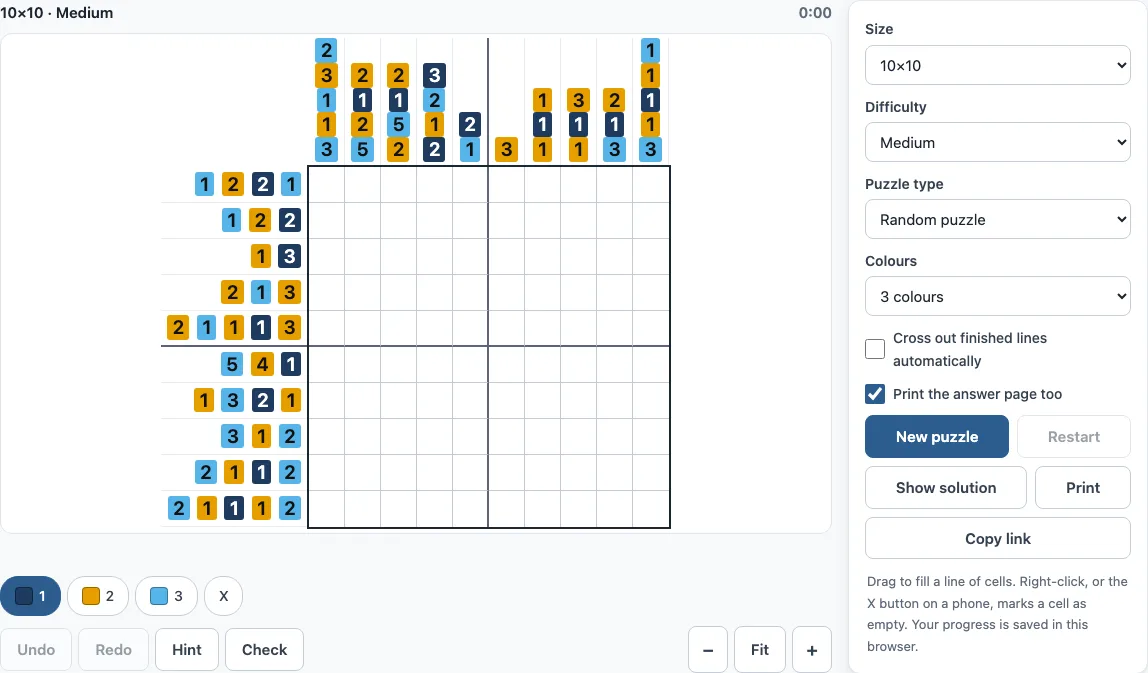
How to play colour nonograms here
- Open the Colours menu and pick 2, 3 or 4 colours. The default is 3.
- Choose a size: 10x10, 15x15 or 20x20.
- Choose a difficulty: Easy, Medium or Hard.
- Choose a puzzle type: Random puzzle or Picture puzzle.
- Read the clue numbers. Each number is drawn in its colour, and the numbers in a row or column list the blocks of that colour in order.
- Pick a colour by tapping a palette button (Colour 1, Colour 2, Colour 3 and so on), or press the number keys 1 to 9.
- Fill squares with the chosen colour: click one square, or drag along a row or column to paint several. Use the X button, or right-click, to mark a square as empty.
- Press Hint to reveal the next missing or wrong square. Press Check to mark wrong squares in red.
- Use Undo and Redo to step back and forward. Restart clears the grid, and Show solution reveals the answer.
The Print button prints the puzzle, and Copy link copies a link to it. A timer runs while you solve. Large hard puzzles, such as 20x20 Hard with 4 colours, can take a second or two to generate, and a “Generating…” message appears while you wait.
Puzzles you print here are free to use in class or in products you sell, such as Etsy printables.
How to solve color nonograms
Start with the lines that have the longest clues. A block that is long enough must cover some squares in every position it can take. For example, a clue of 7 in a 10-square line must fill squares 4 to 7, because the block can start anywhere from square 1 to square 4 and always covers those four squares. Mark those squares in the right colour, then look at the crossing rows and columns, since each new square may settle another clue.
Colour adds one rule to check. Two neighbouring blocks of the same colour need at least one empty square between them. Blocks of different colours can touch with no gap. Use this when you count the space a line needs: a red 2 followed by a blue 3 needs only 5 squares, while a red 2 followed by a red 3 needs 6, because same-colour blocks need a gap. The overlap rule still works for each colour on its own.
Keep notes of which squares are certainly empty as well as which are filled. Marking an empty square with X narrows down the places a block can go, and that often unlocks the next line. When you are stuck, the Hint button shows one correct square, which you can use to check your reasoning.
How is a colour nonogram different
A colour nonogram uses the same grid and the same basic logic as a black-and-white one, but each clue carries a colour. The number tells you the length of a block in that colour, and the blocks must appear in the order given. The clue numbers are drawn in their colour on this page, so you can see at a glance which colour each block uses.
The main difference is the gap rule. In a black-and-white puzzle, any two neighbouring blocks need an empty square between them. In a colour puzzle, only blocks of the same colour need that gap. This means colour lines often have fewer empty squares than black-and-white lines, so the clues can be harder to read at first. Take each colour in turn and check the gaps only between blocks that share a colour.
Frequently asked questions
Is the colour nonogram free, and do I need an account?
Yes, it is free. You do not need to sign up or create an account to play.
Is my progress saved?
Yes. Progress is saved automatically in your browser and restored when you come back to the page. Because it is stored in the browser, your progress stays on the device and browser you used.
Can I play on a phone?
The tool runs in a web browser, so you can open it on a phone and play in the same way. Keyboard shortcuts 1 to 9 only work with a physical keyboard, so on a phone use the palette buttons to choose a colour.
Can I print the puzzle?
Yes. Press the Print button to print the puzzle with its clues.
Does every colour puzzle have only one solution?
Yes. Each colour puzzle is checked by the site’s colour solver before it is shown, and it has exactly one solution.
Why does a large puzzle take a moment to appear?
Large hard puzzles, such as 20x20 Hard with 4 colours, take a second or two to generate. The “Generating…” message shows while the puzzle is being made, and it then appears on the grid.
Can I sell the color nonograms I print here?
Yes. Color nonogram puzzles from this page are royalty-free for personal, classroom and commercial use, including KDP books, Etsy printables, Teachers Pay Teachers and print-on-demand. No credit is required. The only thing you may not do is copy the generator or the site itself to run a competing service; see the terms.
Related tools
- Nonogram (play online) - Play the classic black-and-white version when you want to practise the basic rules without colour.
- Easy nonograms - Start here if you are new to solving, with smaller and simpler clues.
- Hard nonograms - Go here for black-and-white puzzles that line-by-line logic alone cannot finish.
- Daily nonogram: three new puzzles every day (10x10, 15x15 and 20x20), the same for everyone, with a 30-day archive.
- 10x10 nonograms - Choose this for quick puzzles on a small grid.
- 15x15 nonograms - Pick this for a medium-sized grid with more room for deduction.
- 20x20 nonograms - Try this for the largest standard grid, where solving takes the longest.
- Giant nonograms - Use this for very big puzzles when you want a long session.
- Nonogram solver - Use it to check a puzzle you are stuck on and see how the clues fit together.