Easy Nonogram
Easy puzzles that never need guessing: every square follows from simple row and column logic.
Recent
Your last 10 settings, saved only in this browser. Nothing is uploaded.
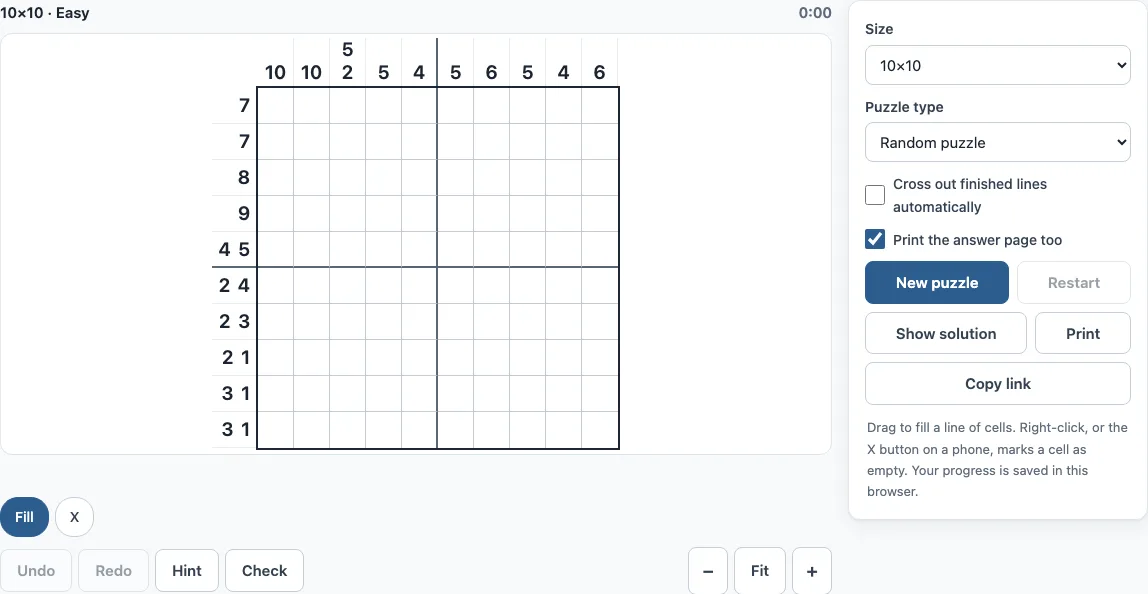
How to play easy nonograms here
- Open the Size menu and choose 5x5, 10x10, 15x15 or 20x20. The default is 10x10.
- Pick a Puzzle type: Random puzzle or Picture puzzle. For a picture puzzle, choose a Picture theme.
- Read the clues. Numbers to the left of a row and above a column give the lengths of the filled blocks, in order.
- Click a square to fill it. Drag across squares to fill a line. The drag stays on the row or column where it started.
- Right-click a square to mark it with an X when you know it is empty.
- If you are stuck, press Hint. It shows one square that a clue proves and names the row or column that proves it.
- Press Check to mark wrong squares in red, or to see how many squares are still to fill.
- When the puzzle is solved, the page shows your time, the number of hints used and, for picture puzzles, the name of the picture.
Keyboard shortcuts: arrow keys move, Space or Enter fills, X marks a cross, Backspace clears, Ctrl+Z (Cmd+Z on Mac) undoes and Shift+Ctrl+Z redoes. The Undo and Redo buttons do the same. Tick “Cross out finished lines automatically” to fill the rest of a completed line with X marks. Print prints the puzzle, and ticking “Print the answer page too” adds the answer on a second page. Copy link gives you a link that opens exactly the same puzzle.
How to solve nonograms for beginners
Start with lines whose clue fills the whole width. If the blocks plus one empty square between each pair add up to the line length, every square in that line is decided, so fill them right away. Then look at large numbers. A block of length n in a line of length L fills the middle 2n − L squares whenever 2n is greater than L. For example, a clue of 7 in a 10-square row fills squares 4 to 7, because every possible position of that block covers them.
Mark Xs in squares that cannot be filled. A known empty square can settle the clue of the line that crosses it, so each mark can open up new moves. Then work through the rows and columns again. A clue of 3 1 in a 5-square line has only one placement (3 + 1 gap + 1 = 5 squares): filled, filled, filled, empty, filled.
How to do a nonogram easy
An Easy puzzle can be solved one line at a time, without guessing. The generator makes sure that it can be finished in at most 3 passes over all rows and columns, or 4 passes on a 20x20 grid. At least half of all lines give a square on the empty grid, so there are always obvious places to start.
Medium puzzles also solve one line at a time, but they need more passes. Hard puzzles have one solution, yet line-by-line logic gets stuck. At that point you must test a square both ways and see which choice leads to a contradiction. When a row or column matches its clue, its numbers turn grey, so you can see which lines are finished.
Are easy nonograms good for kids?
Yes. Start with 5x5: there are only ten clues, and every square can be found by looking at one row or column at a time.
Frequently asked questions
What size should a beginner start with?
Start with 5x5 or the default 10x10. Small grids have fewer lines to track, so each step is easier to check. Move up to 15x15 or 20x20 when you can finish 10x10 puzzles comfortably.
Is it free, and do I need an account?
Yes, it is free, and there is no sign-up. The puzzles are generated on your device, and nothing is uploaded.
Is my progress saved?
Yes. Progress is saved automatically in your browser and restored when you return to the page.
Can I play on a phone?
Yes. On a phone, tap the Fill or X button to choose what a tap does. On a small screen, use the Move button to scroll a zoomed board instead of drawing on it.
Does every puzzle have exactly one solution?
Yes. Puzzles are kept only after the solver confirms that the solution is unique, so you never have to guess between two valid answers.
What does the X mark do?
An X marks a square you know is empty. It is never needed for the solution, but it splits lines into smaller sections and makes the remaining clues easier to place.
What do the grey clue numbers mean?
A clue turns grey when its row or column matches it exactly. It is a quick way to see which lines are finished, but it does not prove the rest of the board is right: use Check for that.
Can I use easy nonograms from here in my Teachers Pay Teachers or Etsy shop?
Yes. Easy nonogram puzzles from this page are royalty-free for personal, classroom and commercial use, including Amazon KDP puzzle books, Etsy printables, Teachers Pay Teachers and print-on-demand products. No credit is required. The only thing you may not do is copy the generator or the site itself to run a competing service; see the terms.
Related tools
- Nonogram (play online): the main puzzle page, with the full set of size and type options.
- Picross online: use it if you know the Picross name and want the same style of logic puzzle.
- Hard nonograms: try these when you can solve Easy puzzles and want line logic that gets stuck.
- Color nonogram: choose it when you want puzzles where the squares have more than one colour.
- 10x10 nonograms: use it to practise the default grid size.
- 15x15 nonograms: try it after you are comfortable with 10x10 puzzles.
- 5x5 nonograms: mini puzzles of 25 squares, the gentlest way to learn the rules.
- Giant nonograms: use it for very large boards with many lines to solve.
- Nonogram solver: use it to check a puzzle’s logic after you have tried it yourself.