Galaxies Puzzle
Draw walls to split the grid into galaxies: each holds one dot and looks the same turned half way round it.
Recent
Your last 10 settings, saved only in this browser. Nothing is uploaded.
The galaxies puzzle, also called spiral galaxies or Tentai Show, is a logic puzzle played on a grid marked with dots. This free tool lets you play it in your browser: you draw walls along cell borders until the grid splits into galaxies, each holding exactly one dot.
It works on phones, tablets and computers, and you do not need an account or sign-up. Each puzzle is generated from a random seed when the page opens, and the tool keeps it only if its own solver confirms there is exactly one solution. You can choose a 5×5, 7×7 or 10×10 grid and an Easy, Medium or Hard level. Hints, error checking and a timer help you as you go. Puzzles you print here are free to use in class or in books and printables you sell.
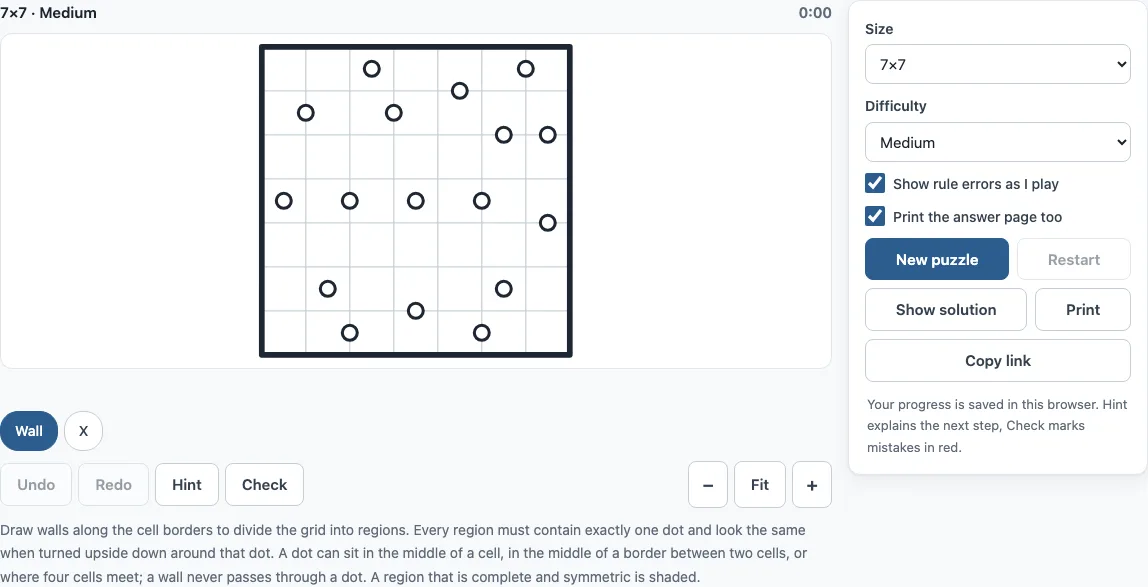
How to use the Galaxies puzzle
- Choose a Size (5×5, 7×7 or 10×10) and a Difficulty (Easy, Medium or Hard), then select New puzzle. “Generating…” shows while the new puzzle is made.
- Click or tap a border between two cells to draw a wall. Click or tap it again to remove the wall.
- Right-click, or use the X chip, to mark a border as “no wall”. On a phone or tablet, choose the Wall or X chip above the board first.
- Drag along borders to set several walls at once.
- Watch for shaded regions. A closed region that is valid (one dot, symmetric) shades lightly. A red mark means a rule is broken.
- Press Hint when you are stuck, Check to find mistakes, or Show solution to reveal the answer.
On a computer, the arrow keys move between grid points, and Shift plus an arrow draws or erases the wall in that direction. Undo and Redo work with Ctrl+Z and Shift+Ctrl+Z (Cmd on a Mac). Restart clears the board but keeps the same puzzle. Print gives you the puzzle with its size, difficulty and rules, and you can choose Save as PDF in the print dialog. Copy link gives you a link that opens exactly the same puzzle on another device.
Galaxies puzzle rules
The grid has dots. You draw walls along cell borders to divide the grid into regions called galaxies. Every galaxy must contain exactly one dot, and it must be 180-degree rotationally symmetric about that dot. A wall never passes through a dot, and the outer frame is always a wall. A dot can sit in the middle of a cell, in the middle of a border between two cells, or on a grid point where four cells meet. Galaxies range from 1 to about 12 cells.
How to solve spiral galaxies
Start with the cells you can be sure of. The cells around each dot belong to it: 1 cell for a centre dot, 2 for an edge dot and 4 for a grid-point dot. Then draw walls between cells that belong to different dots. After that, grow each galaxy one cell at a time, and always add the mirror cell as well.
The site’s solver uses three rules. The mirror rule says that if a cell’s mirror is outside the grid or already taken, the dot cannot own that cell. The reach rule says a cell can only belong to a dot if a chain of possible cells links the dot to it. The bridge rule says a cell that every such chain must pass through also belongs to that dot. Easy puzzles need only the mirror rule. Medium puzzles also need reach. Hard puzzles need bridge or trial and error. On 5×5, a Hard puzzle cannot always be made, so the closest level is used and the puzzle title shows the real level.
As an example, the first hint in a 7×7 Easy puzzle (seed 3) marks a border. It says the cells on its two sides cannot belong to the same galaxy, because every dot that could claim one of them would need a mirror cell outside the grid or inside another galaxy.
What is rotational symmetry in this puzzle
Rotational symmetry means that a galaxy looks the same after you turn it half way round its dot (180 degrees). Each cell in the galaxy has a mirror cell, which is the cell at the matching position on the other side of the dot. The cell under a centre dot is its own mirror. The two cells beside an edge dot are mirrors of each other, and the four cells around a grid-point dot pair up diagonally. Every larger galaxy is built from such mirror pairs.
If a closed region has one dot but is not symmetric about it, the tool shows a live error in red. You can turn off “Show rule errors as I play” for a harder game.
Frequently asked questions
Is the galaxies puzzle free, and do I need an account?
Yes, it is free. There is no account or sign-up, and nothing is uploaded. Your progress and settings are saved automatically in your browser.
Can I play the galaxies puzzle on a phone?
Yes. It works on phones, tablets and computers. On a phone, the Wall and X chips above the board choose what a tap does, and the Move chip lets you scroll a zoomed board.
Can I print the galaxies puzzle?
Yes. Print gives you the puzzle on its own page with its size, difficulty and rules. Tick “Print the answer page too” to add the solution on a second page, and choose Save as PDF if you want a file. A4 and Letter both work.
Does every galaxies puzzle have one solution?
Yes. Each puzzle is generated in your browser and kept only when the site’s solver proves it has exactly one solution. That means it can always be finished by logic.
Can I share a puzzle or continue it on another device?
Yes. Copy link copies a link with the size, seed and difficulty in it. It opens exactly the same puzzle, so you can send it to a friend or finish it on another device.
Can I put galaxies puzzles from this page in a book I sell?
Yes. Galaxies puzzles from this page are royalty-free for personal, classroom and commercial use, including KDP books, Etsy printables, Teachers Pay Teachers and print-on-demand. No credit is required. The only thing you may not do is copy the generator or the site itself to run a competing service; see the terms.
Related tools
- Shikaku: use it when you want to split a grid into rectangles that each hold one number.
- Slitherlink: use it when you want to draw one loop that follows clue numbers.
- Masyu: use it when you want a single loop that turns at circles in a set pattern.
- LITS puzzle: use it when you want to shade cells to form tetromino shapes.
- Fillomino: use it when you want to fill regions with numbers that match their size.
- Star Battle: use it when you want to place stars so each row, column and region has the same number.
- Nonogram: use it when you want to reveal a picture from row and column clues.
- All puzzles on the site: use it when you want to browse every puzzle type in one place.