Image to Nonogram
Choose a picture: it becomes a black-and-white nonogram with clues, checked for a unique solution, ready to play or print.
Recent
Your last 10 settings, saved only in this browser. Nothing is uploaded.
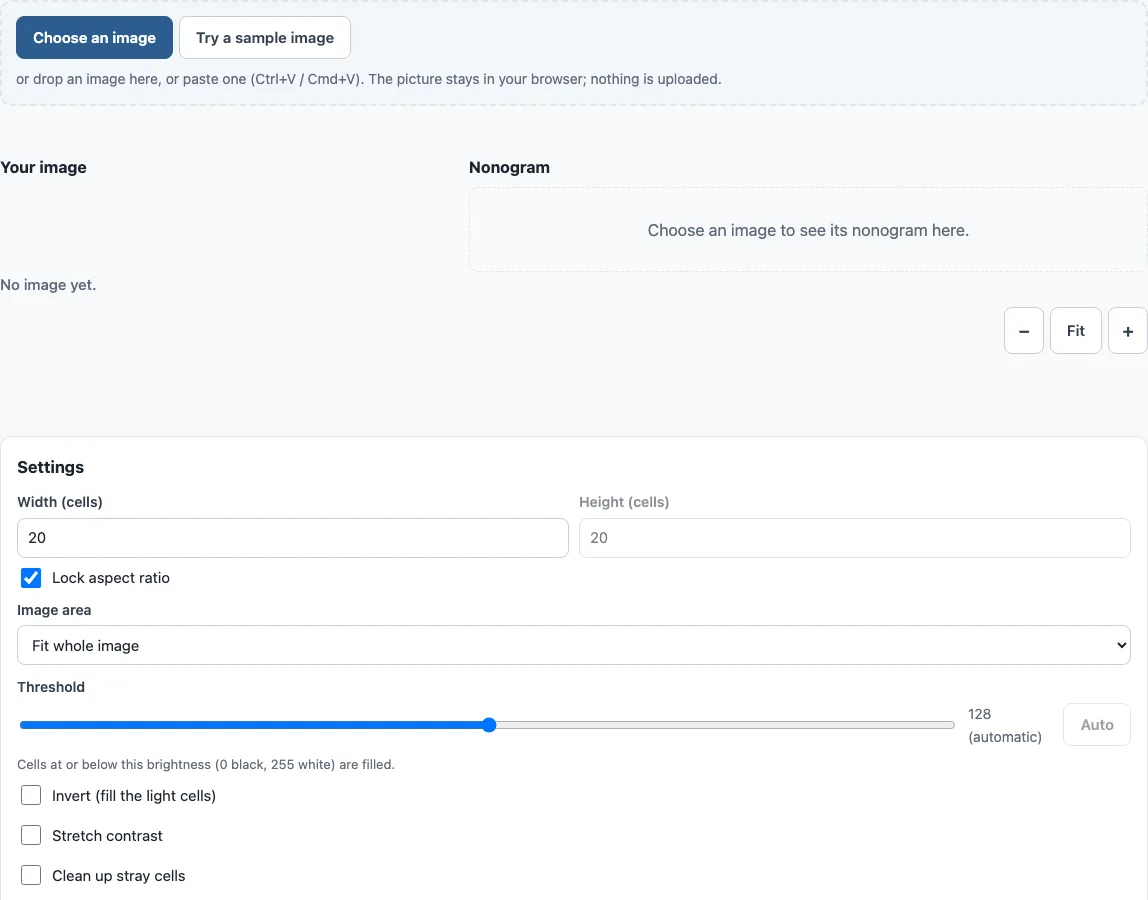
How to turn an image into a nonogram
- Click “Choose an image”, drag an image onto the tool, or press Ctrl+V (Cmd+V on Mac) to paste one. PNG, JPEG, GIF and WebP work. “Try a sample image” draws a smiley face instead.
- Set Width and Height in cells, each from 5 to 40. Keep “Lock aspect ratio” on to let Height follow the picture’s proportions. Unlocked, the picture is stretched to your Height.
- Under “Image area”, choose “Fit whole image” or “Crop to square” to keep only the largest centred square.
- The Threshold slider starts on an automatic value; move it to set your own (higher fills more cells), or click Auto to go back.
- If needed, tick “Invert (fill the light cells)” for light drawings on a dark background, “Stretch contrast” for pale pictures, or “Clean up stray cells” to remove isolated filled squares.
- Read the status line and the uniqueness result. Aim for “Unique solution – playable”.
- If you see “More than one solution”, click “Make it unique”. If the tool cannot fix it, change the threshold or width.
- Use the outputs: Play this puzzle, Edit in maker, Print puzzle, Download SVG, Download answer SVG, or Copy clues as text.
A smaller width makes the uniqueness check faster if it times out. When printing, tick “Add the answer page when printing” to get the solution on a second page. Your settings are remembered in your browser for your next visit, but your image is not.
How do I make a nonogram from a picture?
The tool scales the image so its long side is at most 800 pixels, then turns each pixel into a brightness value from 0 (black) to 255 (white). It divides the area you chose into Width x Height cells and gives each cell the average brightness of the pixels it covers. A cell is filled when its brightness is at or below the threshold, and the clues are then read from those filled cells.
Brightness is calculated with the Rec. 709 luma formula, 0.2126 R + 0.7152 G + 0.0722 B. Transparent pixels count as white. The threshold starts at a value that Otsu’s method calculates to best separate dark cells from light ones.
Which images work best for a nonogram?
Simple pictures with strong contrast and a clear outline convert most cleanly, such as logos, icons, silhouettes and cartoons. Each cell averages many pixels, so fine detail blurs into noise at small sizes. If a photo is too busy, increase the width, use Crop to square on the subject, or turn on Stretch contrast for pale, low-contrast images.
Why does my picture have more than one solution?
A clue gives only the length of each block of filled squares in a row or column, not where the block sits. Some patterns can be swapped without changing any clue, such as two diagonal squares in a 2x2 area (a checkerboard part). A nonogram with several solutions is not a fair puzzle, so the tool reports the number of cells where two solutions differ. Make it unique compares two solutions, flips the differing cell that disagrees most with its neighbours, and checks again, up to 60 tries.
What do the clue numbers in a nonogram mean?
Each number is the length of a block of consecutive filled squares. Row clues read left to right and column clues read top to bottom. At least one empty square separates two blocks in the same line, and a clue of 0 means the whole line is empty. Solvers combine these rules across rows and columns until the picture is revealed.
Frequently asked questions
Can it solve a nonogram from a photo of a puzzle?
No. The tool does not read clues from a photo. To solve an existing puzzle, type its row and column clues into the nonogram solver. Copy clues as text produces lists in a format the solver can read.
Can it make a colour nonogram from an image?
No. The tool makes black-and-white nonograms only. For puzzles with several colours, see the color nonogram page.
Is my image uploaded?
No. The picture is processed only in your browser, using a canvas. Nothing is uploaded, and the image is not stored.
Can I touch up the grid by hand?
Yes. Edit in maker opens the grid in the nonogram maker, where you can change individual cells. Use it when Make it unique cannot fix the puzzle.
What grid size should I choose?
Width and Height can each be 5 to 40 cells. A wider grid keeps more of the picture’s detail but makes a longer puzzle, and the uniqueness check takes longer. The tool starts at 20 cells across. Very small grids work best for bold, simple shapes.
Is the image to nonogram tool free?
Yes. It is free, needs no account, and every puzzle you make can be played, printed or shared with a link without signing up.
Can I sell nonograms made from my own pictures?
Yes. Nonograms made here are royalty-free for personal, classroom and commercial use, including KDP puzzle books, Etsy and Teachers Pay Teachers listings, and print-on-demand products. You need the rights to the image you upload, because the nonogram is made from your picture and we cannot grant rights to it. No credit is required. The only thing you may not do is copy the generator or the site itself to run a competing service; see the terms.
Related tools
- Nonogram maker: Design a puzzle cell by cell when you do not want to start from an image.
- Nonogram solver: Type in clues to check a puzzle or find its solution.
- Nonogram: Play nonogram puzzles online in your browser.
- Printable nonograms: Print puzzles on paper to solve away from the screen.
- Picross online: Play Picross-style puzzles in the browser.
- Color nonogram: Try puzzles with several colours instead of black and white.
- How to play nonogram: Learn the logic and techniques for solving clue-based grids.
- 5x5 nonograms: Start with small grids that are quick to solve.
- All nonogram puzzles: Browse the full set of puzzles to choose from.