Light Up Puzzle (Akari)
Place bulbs so every white cell is lit, no bulb shines on another, and each number counts the bulbs beside it.
Recent
Your last 10 settings, saved only in this browser. Nothing is uploaded.
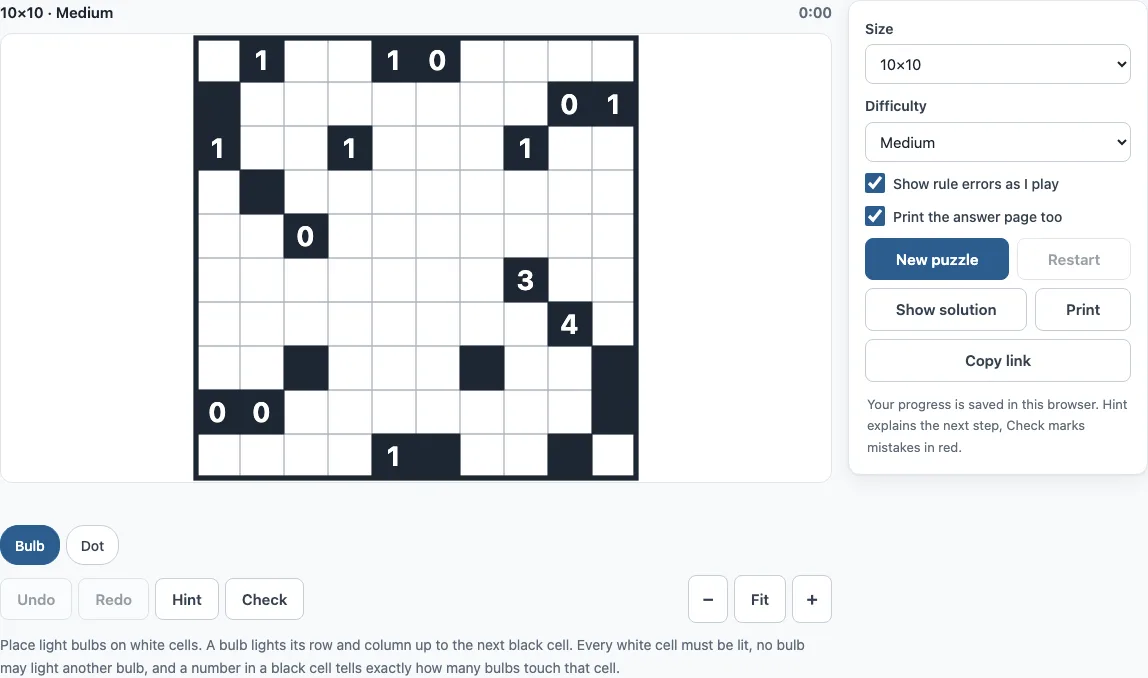
How to use the Light Up puzzle
- Choose a board size in Size: 7×7, 10×10 or 14×14. The default is 10×10.
- Choose Difficulty (Easy, Medium or Hard), then select New puzzle. The label “Generating…” shows while the board is made. If a size cannot produce the level you asked for, the closest level is used, and the puzzle title shows the real level.
- Click or tap a white cell to place a bulb. Click or tap it again to remove the bulb.
- Right-click, or use the Dot chip, to mark a cell where no bulb can go.
- Watch the lit cells, which turn yellow. With “Show rule errors as I play” on, a rule break turns red as soon as it appears.
- If you get stuck, select Hint. It highlights the cells involved and explains in one sentence which rule proves the next step. Select Check to see wrong cells in red, or the message “No mistakes so far” with the percentage done.
- When the puzzle is solved, the page shows “Solved in m:ss” and offers Next puzzle.
You can move with the arrow keys, place a bulb with Space, mark a dot with X, and clear a cell with Backspace. Undo and Redo use Ctrl+Z and Shift+Ctrl+Z (Cmd on a Mac). Restart clears the board but keeps the same puzzle. Print prints the puzzle on its own page, and Copy link creates a link that opens exactly the same puzzle, which is useful for continuing on another device.
Light Up rules
Light Up is played on a grid of white and black cells. You place bulbs on white cells so that every white cell is lit, no bulb lights another bulb, and each numbered black cell has exactly that many bulbs directly beside it (up, down, left or right).
A bulb lights its own cell and every white cell in its row and column, up to the next black cell. Numbers run from 0 to 4. A black cell without a number may touch any number of bulbs.
How to solve Akari
You can solve most Akari puzzles by logic alone, using four basic rules and one look-ahead rule.
- Lit: a lit cell cannot hold a bulb, because the bulb would see the other bulb.
- Clue-full: when a number already has all its bulbs, its other open neighbours cannot hold one. A 0 clears all four of its neighbours.
- Clue-all: when a number has exactly as many open neighbours as bulbs it needs, every one of them holds a bulb. Examples are a 4, a 3 on an edge, and a 2 in a corner.
- Only: when an unlit white cell can be lit from just one cell, a bulb goes there.
- Shadow: look one step ahead. If a bulb in a cell would leave another white cell with no way to be lit, or would make a number impossible, that cell holds no bulb.
Easy puzzles need only the first four rules. Medium puzzles need shadow. Hard puzzles need trial and error, where you test a bulb and follow the result. On a Medium 10×10 puzzle (seed 3), the first hint points at a 0 and says it already has all its bulbs, so you should put a dot on each cell touching it.
What does Akari mean
Akari is the Japanese word for “light,” which describes what the bulbs do on the board. Nikoli published the puzzle under this name. Many English-speaking players call it Light Up, but both names refer to the same puzzle.
Frequently asked questions
Is the Light Up puzzle free, or do I need an account?
It is free, and you do not need an account or sign-up. Your progress and settings save automatically in your browser, and nothing is uploaded.
Can I play Akari on a phone?
Yes. It works on phones, tablets and computers. On a phone or tablet, the Bulb and Dot chips above the board choose what a tap does, and Move lets you scroll a zoomed board. Fit, the default, sizes the board to the screen width.
Can I print the Light Up puzzle?
Yes. Print puts the puzzle on its own page with its size, difficulty and rules. Tick “Print the answer page too” to add the solution on a second page. Choose “Save as PDF” in the print dialog if you want a file. A4 and Letter paper both work.
Does every Light Up puzzle have one solution?
Yes. Each puzzle is generated in your browser from a random seed and kept only when the site’s solver proves it has exactly one solution, so it can always be finished by logic.
Can I share a puzzle or continue it on another device?
Yes. Copy link copies a link with the size, seed and difficulty in it. It opens exactly the same puzzle, so you can send it to a friend or finish it on another device.
Can I sell light up puzzles printed from this page?
Yes. Light Up (Akari) puzzles from this page are royalty-free for personal, classroom and commercial use, including Amazon KDP puzzle books, Etsy printables, Teachers Pay Teachers and print-on-demand products. No credit is required. The only thing you may not do is copy the generator or the site itself to run a competing service; see the terms.
Related tools
- Kurodoko (Kuromasu): use it for another grid puzzle where numbers count the cells you can see.
- Star Battle: use it for a logic puzzle where you place stars in rows, columns and regions.
- Hitori: use it for a shading puzzle where you remove repeated numbers.
- Nurikabe: use it for a puzzle where you build a connected sea around numbered islands.
- Tents puzzle: use it for a puzzle where you place tents next to trees.
- Heyawake: use it for a region-based shading puzzle with clues in boxes.
- Nonogram: use it to play picture-logic puzzles online.
- All puzzles: use it to browse every puzzle on the site.