Mosaic Puzzle
Fill the cells so every digit counts the filled cells in its 3x3 block, its own cell included.
Recent
Your last 10 settings, saved only in this browser. Nothing is uploaded.
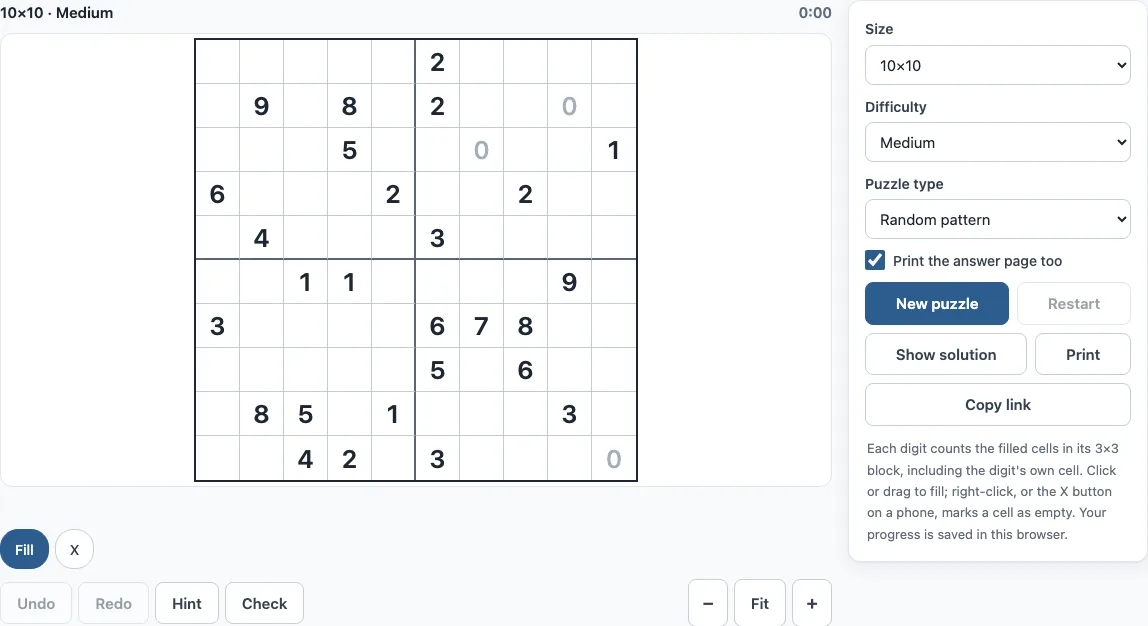
How to play a mosaic puzzle online
- Set Size to a grid from 5x5 to 30x30. The default is 10x10.
- Set Difficulty to Easy, Medium or Hard.
- Under Puzzle type, choose Random pattern or Picture. Picture puzzles use 72 black-and-white designs from 5x5 to 25x25.
- A puzzle is ready when the page opens; click New puzzle after changing a setting, or for a fresh board.
- Click a cell to fill it. To fill a straight line of cells, press and drag across them.
- Right-click a cell to mark it with an X when you know it is empty.
- A digit turns grey when the filled cells around it match it exactly.
- If you are stuck, click Hint. It points to one cell, names the digit or digits that prove it, and says whether the cell is filled or empty. Click Check to see wrong cells in red or how many cells are still to fill.
- Use Restart to clear the board, or Show solution to see the answer.
Keyboard: arrows move, Space fills, X crosses, Backspace clears; Ctrl+Z undoes and Shift+Ctrl+Z redoes. On a phone, choose Fill or X to set what a tap does. Use Move to scroll a zoomed board, and use Zoom out, Fit or Zoom in to change the board size. Print (with “Print the answer page too”) prints the puzzle, and Copy link gives you a link that opens exactly the same puzzle.
Mosaic puzzle rules
Each digit tells you how many cells are filled in the 3x3 block made of that cell and its neighbours. The digit’s own cell counts too, so a digit can be filled as part of its own block. The goal is to fill cells so that every digit is right, and the filled cells form a pattern or picture.
Cells on the edge of the grid see a smaller block. A corner cell’s block has 4 cells, and an edge cell’s block has 6. Some digits give certain answers straight away. A 0 means every cell in its block is empty. A 9 means all 9 cells are filled. A 4 in a corner or a 6 on an edge means its whole block is filled.
How to solve mosaic puzzles
Start with the single-digit rule. Count what the digit still needs: the digit minus the cells already filled in its block. If it needs 0, every undecided cell in its block is empty. If it needs exactly as many cells as there are undecided cells, they are all filled. Easy puzzles can be solved with this rule alone.
Medium puzzles also need the pair rule. Two digits whose blocks overlap share some cells. Compare what each one still needs with the cells only it can see. If all of digit A’s undecided cells lie inside digit B’s block, then the other cells in B’s block must hold exactly B’s remaining need minus A’s remaining need.
Hard puzzles have one solution, but these two rules can get stuck. Then you test a cell: assume it is filled, follow the logic, and see whether you reach a contradiction. If you do, the cell must be empty. The generator removes digits in random order while keeping the puzzle solvable at the chosen level, so every digit left on the board is needed.
Here is an Easy 5x5 example from the generator (seed 3). It has a 0 at row 2, column 2, so the 9 cells around it are empty. The 4 in the bottom-left corner (row 5, column 1) sees only 4 cells, so all 4 are filled. The 6 at row 3, column 5 sits on the edge and sees 6 cells, so all 6 are filled. The finished picture has 13 filled cells.
Frequently asked questions
What is a mosaic puzzle?
A mosaic puzzle is a logic puzzle on a grid where digits tell you how many cells are filled in their 3x3 neighbourhood. The name is also used for photo-mosaic jigsaw puzzles, but this page is the logic puzzle, not a jigsaw.
Is a mosaic puzzle like Minesweeper?
They are similar because both use numbers in a grid, but the numbers work differently. In Minesweeper a number counts mines in the 8 cells around it and ignores its own cell. In a mosaic puzzle the digit’s own cell is part of its block, and all digits are visible from the start.
Can I print a mosaic puzzle?
Yes. Click Print to print the puzzle. Tick “Print the answer page too” if you also want the solution on its own page.
Is the Mosaic Puzzle free? Do I need an account?
It is free, and you do not need to sign up. Puzzles are made on your device, and nothing is uploaded.
Is my progress saved? Can I play on a phone?
Your progress is saved automatically in your browser. On a phone, choose Fill or X to set what a tap does, and use Move to scroll a zoomed board. Large 30x30 Hard puzzles can take a few seconds to generate, and “Generating…” shows while they load.
Can I use these mosaic puzzles in a book or Etsy shop?
Yes. Mosaic puzzles from this page are royalty-free for personal, classroom and commercial use, including puzzle books on Amazon KDP, printables on Etsy, Teachers Pay Teachers and Gumroad. No credit is required. The only thing you may not do is copy the generator or the site itself to run a competing service; see the terms.
Related tools
- Nonogram (play online) - Use this if you want to fill rows and columns from clues written outside the grid.
- Picross online - Choose this for another picture-style logic puzzle with clues on the edges.
- Color nonogram - Try this when you want puzzles where cells come in several colours.
- Star Battle - Pick this to place stars so every row, column and region holds the same number.
- Nurikabe - Use this for a shading puzzle where numbers set the size of each unshaded island.
- Printable nonograms - Choose this when you want puzzles to solve on paper.
- Image to nonogram - Use this to turn your own image into a nonogram puzzle.
- How to play nonogram - Read this for step-by-step help with nonogram solving.
- All nonogram puzzles - Browse this page to find every nonogram puzzle on the site.