Nonogram Maker
Draw a picture on the grid; the clues, a uniqueness check, a play link and a print version are made for you.
Recent
Your last 10 settings, saved only in this browser. Nothing is uploaded.
Nonogram Maker is a free nonogram creator that runs in your browser. You draw a picture on a grid, and the tool builds the row and column clues for you, so the drawing can be played as a logic puzzle. No sign-up is needed, and nothing you make is uploaded.
Use it as a nonogram generator when you want a starting point. The Generate random button fills the grid with a random medium-difficulty puzzle of the current size. Use it as a nonogram editor to change an existing drawing, or to build a custom nonogram from scratch. Picross is another name for the same type of puzzle, so this also works as a picross maker. When your puzzle is ready, Check puzzle tells you whether it has exactly one solution.
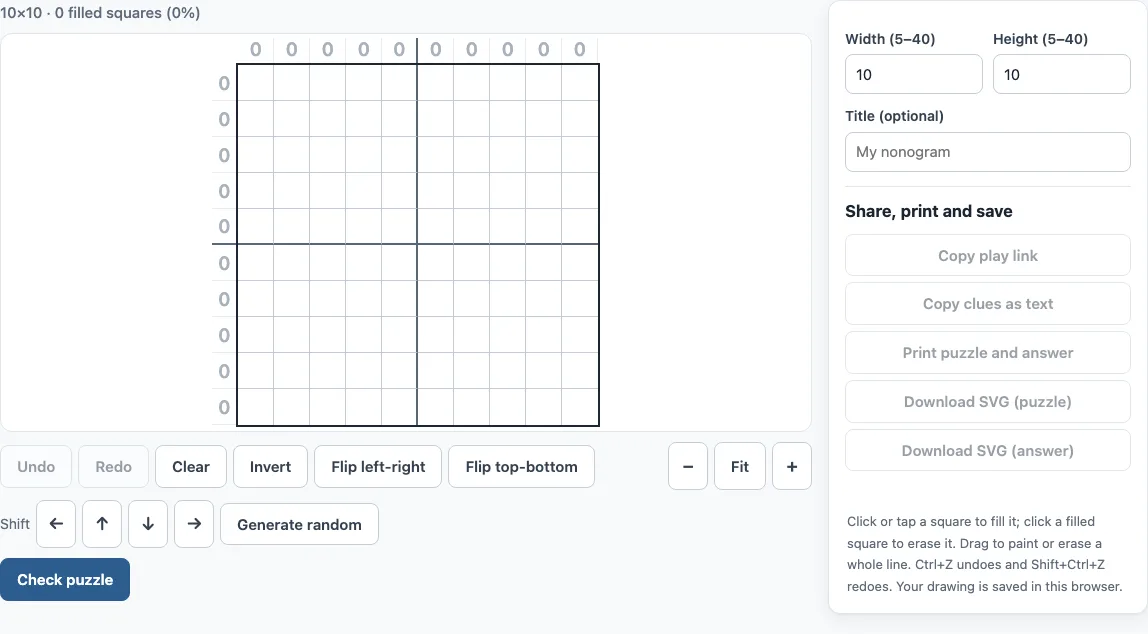
Using the nonogram maker step by step
- Set the Width and Height. Each can be anywhere from 5 to 40 squares.
- Click a square to fill it. Click a filled square to erase it.
- To paint or erase a whole line faster, drag along a row or column.
- Watch the clues beside each row and above each column. They update after every stroke.
- Use Undo and Redo (or Ctrl+Z and Shift+Ctrl+Z) to step back and forward.
- Use Clear, Invert, Flip left-right or Flip top-bottom to change the whole picture at once.
- Move the picture one square at a time with the ← ↑ ↓ → buttons. Squares that leave one edge reappear on the opposite edge.
- Use the − , Fit and + buttons to zoom in or out.
- Optionally, type a title of up to 60 characters.
- Click Check puzzle. If orange squares appear, add or remove a filled square there and check again until the tool reports exactly one solution.
Generate random replaces your current drawing with a new puzzle, so use Undo if you want your drawing back. When you change the width or height, the top-left part of the drawing is kept. The status line shows the size and the number of filled squares with the percentage. The title appears on the printed sheets and in the SVG file name.
The puzzles you make here are free to use in class or in products you sell, such as KDP books or Etsy printables.
How do nonogram clues work?
Each number beside a row or above a column is a clue. It gives the lengths of the blocks, or runs, of filled squares in that line, in order from left to right or top to bottom. A clue of 0 means the whole line is empty. Between two blocks in the same line there is at least one empty square, so the clue 2 1 means a block of two filled squares, a gap, then a single filled square.
How to make a nonogram
Start with a clear shape that has solid areas, such as a heart, a mushroom or a letter. Avoid many isolated single squares and checkerboard patterns, because they often allow more than one solution. Try to keep roughly half the squares filled, which gives the solver enough clues to work with. Then check the puzzle and adjust it until it is fair.
What makes a nonogram easy or hard?
The difficulty Check puzzle reports comes from how the site’s solver gets through your clues. Easy means it can be solved one line at a time in a few passes, with many lines giving a square on the empty grid. Medium is still solvable line by line but needs more passes. Hard means line-by-line logic gets stuck and a square has to be tested both ways. Big solid shapes tend to be easier; thin lines and scattered squares tend to be harder.
How do I make sure my nonogram has only one solution?
A nonogram is only fair when its clues lead to one picture. Check puzzle runs the site’s solver on your clues. If there is exactly one solution, the tool reports it, along with a difficulty of easy, medium or hard and whether line-by-line logic alone solves it. If there is more than one solution, the squares that differ between two solutions are outlined in orange. Changing one of those squares usually makes the puzzle unique. Keep checking after each change: a player who solves your puzzle cannot know which of two valid pictures you meant.
Frequently asked questions
Can I share or print my puzzle?
Yes. Copy play link and Play it give you a link that opens your puzzle in the online player, and anyone with the link can solve it. Print puzzle and answer prints both sheets, and you can also download the puzzle or answer as an SVG file.
Is it free?
Yes. The tool costs nothing to use, and you do not need to create an account.
Is a picross the same as a nonogram?
Yes. Picross is another name for the same logic puzzle, where the numbers on the edges describe the filled blocks in each row and column.
Is my drawing saved?
Yes. Once you start editing, the drawing, its size and its title are saved as a draft in your browser and come back when you reopen the page. Nothing is uploaded.
Can I send my puzzle to the solver?
Yes. Copy clues as text gives the row and column clues as rows: and columns: lists that the nonogram solver on this site reads, and Open in solver opens them there directly, with step-by-step explanations.
Can I make a colour nonogram?
Not with this maker: it draws black-and-white puzzles only. Colour puzzles can be played on the color nonogram page.
Can I sell the nonogram puzzles I draw in the maker?
Yes. Nonograms you draw in the maker are royalty-free for personal, classroom and commercial use, including Amazon KDP puzzle books, Etsy printables, Teachers Pay Teachers and print-on-demand products. No credit is required. The only thing you may not do is copy the generator or the site itself to run a competing service; see the terms.
Related tools
- Nonogram (play online) - Solve nonogram puzzles directly in your browser.
- Picross online - Play picross-style puzzles if you prefer that name.
- Easy nonograms - Start here if you are new to reading clues.
- Hard nonograms - Try these when you want a bigger challenge.
- Daily nonogram - Solve a new puzzle each day.
- Color nonogram - Use this when your picture needs more than one color.
- 10x10 nonograms - Good for small, quick puzzles.
- 15x15 nonograms - A medium grid for a longer solve.
- 20x20 nonograms - Larger grids with more detail.
- Image to nonogram - Start from a picture instead of a blank grid and get a puzzle checked for one solution.