Norinori
Shade exactly two cells in every region so that the shaded cells form dominoes, and dominoes never touch along an edge.
Recent
Your last 10 settings, saved only in this browser. Nothing is uploaded.
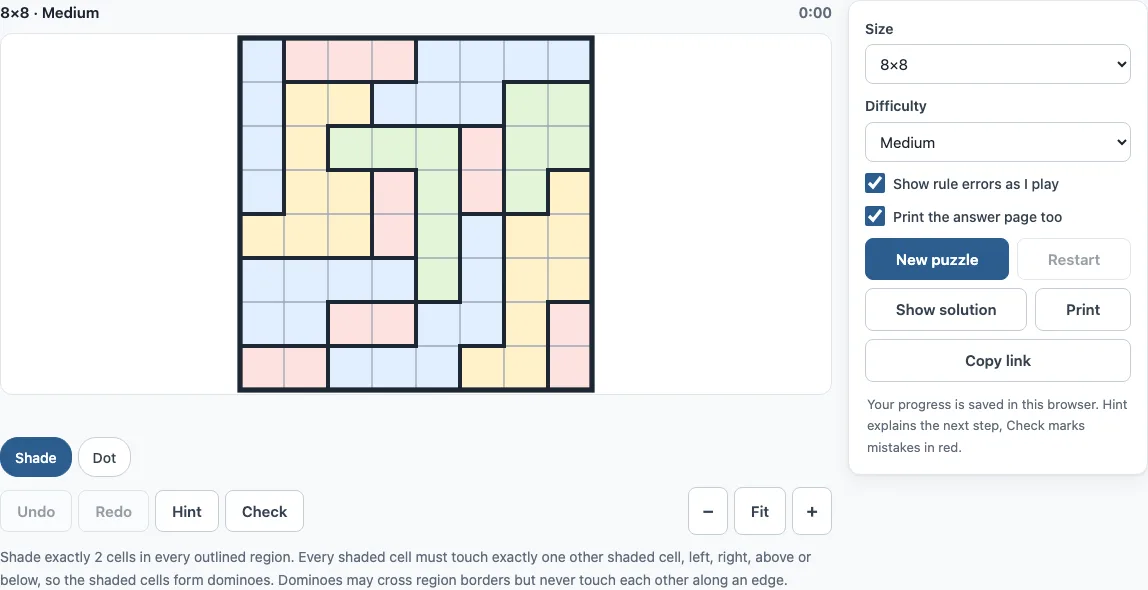
How to play norinori online
- Choose a size (6×6, 8×8 or 10×10; the default is 8×8) and a difficulty (Easy, Medium or Hard) above the board. Press New puzzle for a fresh one, and wait while “Generating…” shows.
- Click or tap a cell to shade it. Click or tap it again to clear it.
- When you know a cell must stay unshaded, right-click it, or tap the Dot chip first and then the cell.
- Shade exactly two cells in every region. Make sure each shaded cell touches exactly one other shaded cell, left, right, above or below.
- Watch for red marks. With “Show rule errors as I play” on, a region with more than two shaded cells, a shaded cell with two or more shaded neighbours, and a shaded group larger than two appear in red.
- If you get stuck, press Hint. It highlights the cells involved and explains in one sentence which rule proves the next step. Press Check to see wrong cells in red, or “No mistakes so far” with the percentage done.
- When the puzzle is solved, the page shows “Solved in m:ss” and how many hints you used. Press Next puzzle to continue.
Keyboard players can move with the arrow keys, shade with Space, mark a dot with X and clear with Backspace. Undo and Redo work with Ctrl+Z and Shift+Ctrl+Z (Cmd on a Mac). Copy link opens the same puzzle on another device, and Print can add an answer page.
Norinori rules
The rules of norinori are simple: shade exactly two cells in every outlined region, and make sure every shaded cell touches exactly one other shaded cell, horizontally or vertically. Because each shaded cell has exactly one partner, the shaded cells always form dominoes. Norinori is a Nikoli puzzle, and its name is read “nori-nori”.
A domino may cross a border between two regions, so its two cells do not have to sit in the same region. Two dominoes may never touch along an edge, but they may touch at a corner. A region with exactly two cells left to shade is always a domino or two halves of dominoes, which is why such regions are often easy to finish.
How to solve norinori
You can solve a norinori puzzle by logic without guessing, because every step follows from the rules. The site’s solver uses four named rules for regions and dominoes. In region-full, a region that already has two shaded cells gets no more. In region-only, a region with exactly two cells left that can be shaded gets both. In domino-done, a shaded cell that already has its partner has all its other neighbours unshaded. In domino-extend, a shaded cell with no partner and only one open neighbour gets that neighbour shaded.
Two more rules block cells. In crowded, an open cell touching two shaded cells would give them a third member, so it stays unshaded. In lonely, an open cell whose neighbours are all unshaded could never get a partner, so it stays unshaded.
Easy puzzles need only these six rules. Medium adds options: list every way a region can still get its two shaded cells, and drop any way that breaks a domino. A cell shaded in every remaining way is shaded, and a cell shaded in none is unshaded. Hard puzzles need trial and error. The hint on a 6×6 Easy puzzle (seed 3) shows region-only at work: “The highlighted region has exactly as many cells left as it still needs shaded, so every one of them is shaded.”
Frequently asked questions
Is norinori free, and do I need an account?
Yes, this norinori game is free. There is no account or sign-up, and nothing you do on the board is uploaded. Your progress and settings are saved in your own browser.
Can I play norinori on a phone?
Yes. The game works on phones, tablets and computers. On a phone, use the Shade and Dot chips above the board to choose what a tap does, and use Fit, Zoom in or Zoom out to size the board.
Can I print norinori puzzles?
Yes. Press Print to get the puzzle on its own page, with its size, difficulty and rules. Tick “Print the answer page too” to add the solution on a second page, and choose “Save as PDF” in the print dialog if you want a file. A4 and Letter both work.
Does every norinori puzzle have one solution?
Every puzzle on this page has exactly one solution. The site generates each puzzle in your browser from a random seed and keeps it only when its own solver proves that. You can therefore finish it by logic without choosing between two answers.
Is norinori the same as LITS or Star Battle?
No. Norinori asks you to shade cells so that they form dominoes, with two shaded cells in each outlined region. Star Battle asks you to place stars, and LITS asks you to shade a four-cell shape in every region so that all shaded cells connect. The rules differ, so solving techniques for one do not carry over directly.
Can I sell norinori puzzles I print here?
Yes. Norinori puzzles from this page are royalty-free for personal, classroom and commercial use, including KDP books, Etsy printables, Teachers Pay Teachers and print-on-demand. No credit is required. The only thing you may not do is copy the generator or the site itself to run a competing service; see the terms.
Related tools
- Star Battle: use it if you prefer placing stars so that each row, column and region has the same number.
- Shikaku: use it if you want to split a grid into rectangles that each hold one number.
- Binary puzzle (Binairo): use it if you like filling a grid with two symbols under row and column rules.
- Slitherlink: use it if you prefer drawing a single loop guided by numbers.
- Nurikabe: use it for another shading puzzle, where the shaded wall must stay connected around numbered islands.
- Hitori: use it if you like shading cells so that no number repeats in a row or column.
- Tents puzzle: use it to place a tent beside every tree with row and column counts.
- Mosaic puzzle: use it when you want digits that count the shaded cells around them.
- Heyawake: play it for room-based shading with numbers that count the shaded cells.