Picross Online
Picture puzzles in classic picross style: wrong squares are flagged at once, and each solved grid reveals a picture.
Recent
Your last 10 settings, saved only in this browser. Nothing is uploaded.
Picross is a logic puzzle played on a grid, where number clues tell you which squares to fill to reveal a hidden picture. This picross online tool lets you play picross puzzles in your browser for free. Nothing needs to be installed, and there is no sign-up.
Puzzles are made on your device, so nothing is uploaded. You can choose 5x5, 10x10 or 15x15 grids, and the Picture theme menu lets you pick a subject such as Animals, Food or Transport. Every puzzle has exactly one solution, so you can work it out with logic instead of guessing. A timer runs while you play, and when you finish, the page names the picture you found. Puzzles you print here are free to use in class or in products you sell, such as KDP books or Etsy printables.
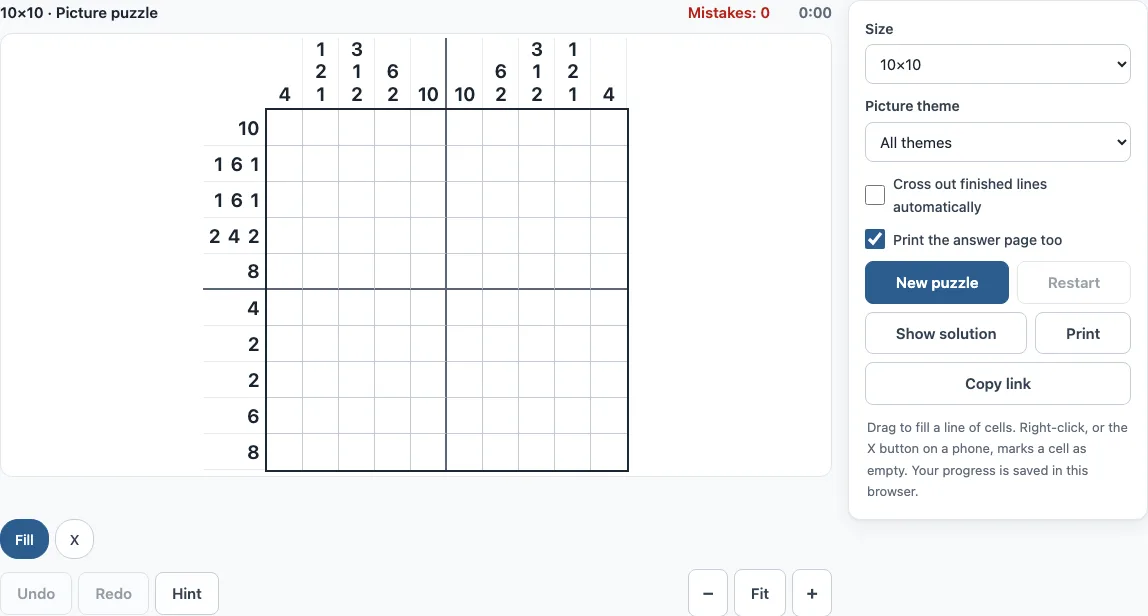
Picross online, step by step
- Choose a size: 5x5, 10x10 or 15x15. If you want a subject, open the Picture theme menu and pick one.
- Read the clues. The numbers to the left of each row and above each column tell you the lengths of the filled blocks in that line.
- Click a square to fill it. To fill several squares at once, drag across a line. The drag stays on the row or column where it started.
- Right-click a square to mark it with an X when you know it is empty.
- On a phone, tap the Fill or X button first to choose what a tap does, then tap the squares.
- Use the arrow keys to move, Space or Enter to fill, X to mark a cross, and Backspace to clear a square.
- If you fill a wrong square, it turns red at once and the Mistakes counter goes up. Press Ctrl+Z (Cmd+Z on Mac) to undo, or Shift+Ctrl+Z to redo. The Undo and Redo buttons do the same.
- When you are stuck, press Hint. Show solution reveals the full answer, and Restart clears the grid so you can begin again.
- When a row or column matches its clue, its numbers turn grey.
The option “Cross out finished lines automatically” fills the remaining squares of a finished line with X marks. Print and Copy link work as they do on the other puzzle pages.
What is picross
Picross is a type of logic puzzle in which a grid hides a picture. Each row and column has numbers, called clues, that describe the blocks of filled squares in that line. Filling the correct squares reveals the picture. The word “picross” is a contraction of “picture crossword.”
How to play picross
Each clue lists block lengths in order, from left to right for rows and from top to bottom for columns. Two blocks in the same line always have at least one empty square between them. A clue of 0 means the whole line is empty. Use these rules to check every move: a line must match its clue exactly, with the blocks in the stated order.
How do you play picross step by step
Start with the lines where the clues force squares. If a block of length n sits in a line of length L and 2n is greater than L, the middle 2n − L squares must be filled. For example, a clue of 7 in a 10-square row fills squares 4 to 7, because every possible position of that block covers them. Mark the empty squares with X as you go, then check the crossing lines again. Each new square can unlock more squares in the lines that cross it.
What are picross puzzles called
Picross puzzles are called nonograms. The name nonogram is used in puzzle books and by puzzle solvers around the world. Nintendo uses the name “Picross” for its video games, while this page uses the general term for the puzzle type.
How to solve picross with small numbers
Small clues leave more room for choice, but the arithmetic still helps. A clue of 3 1 in a 5-square line has only one placement, because 3 + 1 gap + 1 = 5. The answer is filled, filled, filled, empty, filled. A clue of 1 1 1 in a 5-square line also has one placement: filled, empty, filled, empty, filled. A single 1 in a 5-square line has many placements, so skip it and look for a line that crosses it, where other clues may settle the square.
Is this the Nintendo game
No. Picross is the name Nintendo gives to its nonogram video games, starting with Mario’s Picross for Game Boy in 1995. This page is an independent website, not affiliated with or endorsed by Nintendo, and it uses no Nintendo characters or artwork. Its puzzles are flat 2D grids, while Picross 3D, a different Nintendo game, uses blocks of cubes.
Frequently asked questions
Is picross online free, and do I need an account?
Yes, it is free. You do not need an account or a sign-up to play.
Is my progress saved?
Yes. Your progress is saved automatically in your browser and restored when you return to the page. Nothing is uploaded, because the puzzles are made on your device.
Can I play picross on a phone?
Yes. On a phone, tap the Fill or X button to choose what a tap does, then tap the squares.
Can I print the puzzle?
Yes. Press Print to print the puzzle; tick ‘Print the answer page too’ to add the answer on a second page.
Does each picross puzzle have only one answer?
Yes. Every picture on this page was checked with the site’s solver: its clues have exactly one solution, and it can be solved line by line, so you never need to guess between two valid answers.
How many picture puzzles are there, and what sizes are offered?
This page offers 5x5, 10x10 and 15x15 sizes, with 58 pictures in those sizes. Pictures come in 8 themes: Animals, Food, Nature, Objects, Faces, Holidays, Sports and Transport.
Can I undo a mistake?
Yes. Undo (Ctrl+Z, or Cmd+Z on Mac) steps back one move, and a whole drag counts as one move. Redo (Shift+Ctrl+Z) puts it back.
Can I use picross puzzles from this page commercially?
Yes. Picross puzzles from this page are royalty-free for personal, classroom and commercial use, including KDP puzzle books, Etsy and Teachers Pay Teachers listings, and print-on-demand products. No credit is required. The only thing you may not do is copy the generator or the site itself to run a competing service; see the terms.
Related tools
- Nonogram (play online) - Play the general nonogram puzzle when you want to start with the main game.
- Easy nonograms - Choose this when you are learning the clue rules and want smaller, simpler grids.
- Hard nonograms - Try this when you have solved easier puzzles and want more challenging grids.
- Color nonogram - Use this when you want clues and pictures that use more than one color.
- 15x15 nonograms - Use this for larger grids with more clues to combine.
- 20x20 nonograms - Choose this for big grids that need many lines of logic.
- Mosaic puzzle - Try this for picture puzzles where digits inside the grid count the filled cells around them.
- Nonogram solver - Use this to check your clue reading or to see how a grid can be solved.
- Daily nonogram: three new puzzles every day.